FAQ page examples for developer tools and SaaS
An FAQ page is often the last thing a SaaS team writes and the first thing a careful buyer reads. Developers in particular land there with a specific worry. Will this work with my stack? What happens to my data? What does it cost once we grow? If the page dodges those questions, they leave for the docs, a forum or a competitor.
This post covers what a good FAQ page answers, the patterns that show up on strong ones and how to rewrite an answer that says nothing.
Start from real questions
The best FAQ pages are built from support tickets, sales calls and community threads, not from a brainstorm. Pull the last few months of tickets and tag them by topic. The ten topics that come up most are your first draft.
Questions people actually ask tend to be blunt. "Can I self host this?" is more useful as a heading than "Deployment options." Keep the reader's wording where you can, because it matches what they'll search for.
The questions developers expect answered
Across developer tools and SaaS products, the same groups come up again and again.
- Pricing and limits. What's free, what triggers a paid tier, what happens at the limit.
- Data and security. Where data is stored, who can access it, how to delete it.
- Integrations. Which languages, frameworks and services are supported.
- Accounts and teams. Seats, roles, SSO, transferring ownership.
- Reliability. Status page, rate limits, what happens during an outage.
- Leaving. How to export data and cancel.
That last group gets skipped a lot. Answering it plainly builds more trust than almost anything else on the page.
Patterns that work
Group by topic, not by date added. A flat list of thirty questions is hard to scan. Five headed sections with five or six questions each is easier.
Lead each answer with the answer. The first sentence should be yes, no, a number or a short instruction. Context comes second. It's the same principle behind knowing how to start a paragraph in any kind of writing. Put the point first so a skimmer gets it.
Link out for depth. An FAQ answer should be two to four sentences. If it needs more, link to the docs page that covers it.
Use real numbers. "Generous limits" means nothing. "1,000 API calls per day on the free plan" means something.
Make every question linkable. Give each one an anchor so support can paste a direct link into a ticket reply.
Example answers for a developer tool
Here's how a few entries might look for a hypothetical log monitoring service.
## Pricing

### Is there a free plan?
Yes. The free plan includes 5 GB of logs per month and 7 days of
retention for one project. You can upgrade at any time from the
billing page.

### What happens if I go over my limit?
We keep collecting logs and email you at 80% and 100% of your
quota. Nothing is dropped. Overage is billed at $0.40 per GB on
paid plans. On the free plan, ingestion pauses until the next
month or until you upgrade.

## Data and security

### Where is my data stored?
In AWS us-east-1 by default. Teams on the Business plan can choose
eu-west-1 instead. See the data residency page for details.

### How do I delete my data?
Go to Settings, then Project, then Delete project. All logs are
removed within 24 hours. Backups are purged within 30 days.

## Leaving

### Can I export everything?
Yes. Run `logly export --all` or use the export button in Settings.
You get NDJSON files you can load anywhere.
Each answer opens with the direct reply, adds one or two lines of detail and points elsewhere for the rest.
A vague answer rewritten
Here's a typical first draft for a common question.
Q: Do you support single sign-on?

A: Security is a top priority for our team, and we're always
looking at ways to make our platform more secure and convenient
for enterprise customers. We offer a range of authentication
options to meet the needs of organizations of all sizes. Reach
out to our team to learn more.
The reader still doesn't know the answer. Here's the rewrite.
Q: Do you support single sign-on?

A: Yes, on the Business and Enterprise plans. We support SAML 2.0
with Okta, Azure AD and Google Workspace. Setup takes a few steps
in Settings, then Security. See the SSO guide for walkthroughs.
The rewrite opens with yes, names the plans and providers, and links to the guide. That's what the reader came for.
What to leave out
- Questions nobody asks, written to sneak in a feature pitch.
- Answers that just say "contact us." Give the answer, then offer contact for edge cases.
- Marketing phrases like "best in class" or "seamless."
- Outdated answers. Assign an owner and review the page every quarter.
Structured data
If your FAQ page is public, consider adding FAQPage schema so search engines can read the questions and answers. Keep the marked up text identical to what's on the page.
{
  "@context": "https://schema.org",
  "@type": "FAQPage",
  "mainEntity": [{
    "@type": "Question",
    "name": "Is there a free plan?",
    "acceptedAnswer": {
      "@type": "Answer",
      "text": "Yes. The free plan includes 5 GB of logs per month."
    }
  }]
}
Polishing the last few answers
When an answer still circles the point, drop it into Rephrase AI set to Professional and check whether its wording gets to the yes or no sooner, then put your exact limits and plan names back in by hand.
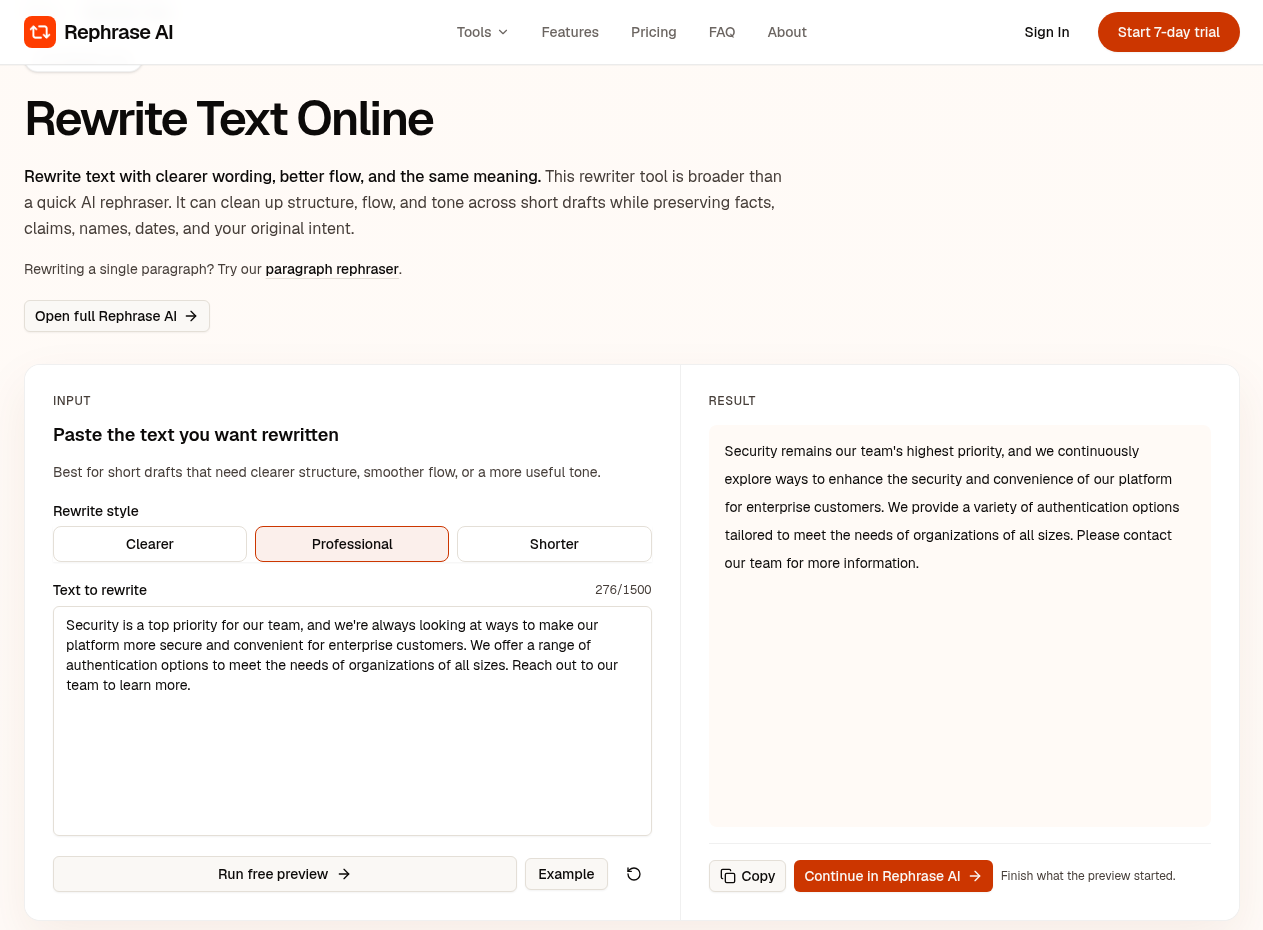
Running a vague FAQ answer through Rephrase AI on Professional.
About the author
- Rephrase what you wrote into what you meant to say.
Comments
Join the discussionNo comments yet. Be the first to comment.